RitchieCam Update!

B&W Fade Filter — XPan 65:24 Aspect Ratio

I just released RitchieCam update 1.2.0! If you have RitchieCam on your iPhone and it didn’t update automatically, be sure to manually do it right now. If you have an iPhone but don’t have RitchieCam, go to the Apple App Store and download it today!

For those who don’t know, RitchieCam is an easy-to-use streamlined camera app intended to bring one-step photography to the iPhone. There are 18 analog-inspired filters so that you don’t have to edit your mobile pictures if you don’t want to. It is intended to be simple enough to be useful for anyone and everyone with an iPhone, and robust enough that even seasoned photographers should find it satisfying. Visit RitchieCam.com to learn more. Also, be sure to follow RitchieCam on Instagram!

What’s new in this update? There are three new features: drag to switch filters, 65:24 aspect ratio, and straight-down level indicator. Each one of these is discussed in detail below. There are also several small improvements and refinements, which will mostly go unnoticed—the most obvious is the enlarged EV +/- switch, hopefully improving its ease of use. Many other features and improvements are in the works, but it takes time to bring them to fruition, so be patient if this update doesn’t include what you were hoping it would—for certain, many great things are coming down the road.

Let’s take a look at the three new features!

Drag to Switch Filters

There’s a new way to select your desired RitchieCam filter even faster—simply drag your finger across the viewfinder! If you are a RitchieCam Patron, far-left is Standard Color, far-right is Dramatic B&W, and the 16 other filters are in-between; otherwise, left is Standard Color, middle is Analog Color, and right is B&W Negative. This is a quick and fun way to get to whichever filter you want to use, or to see which filter might be the best fit for the scene.

The video above is a screen-recording I made using this new feature. Just picture a finger dragging across the screen, left-to-right. I was trying to be slow and smooth, but this is a snappy function, so it is as quick as you are—you are in control of how fast or slowly you swipe through the filter options.

Drag-to-switch is a new way to find and select filters, but the previous methods still work as they always have. I think a lot of you will prefer this new method, but it is completely optional, so nothing changes for you if you like your current process; however, if you ever wished that there was a quicker way to switch filters, now there is!

65:24 XPan Aspect Ratio

Analog Color Filter — XPan 65:24 Aspect Ratio

The 65:24 aspect ratio was made popular by XPan cameras, a joint venture between Fujifilm and Hasselblad. I received a lot of requests for this aspect ratio, so I am happy to announce that it is now an option on RitchieCam! You can capture panoramic pictures straight from RitchieCam, no cropping required.

Currently there are six aspect ratios to choose from: 4:3/3:4, 5:4/4:5, 1:1, 3:2/2:3, 16:9/9:16, & 65:24/24:65. The panoramic 65:24 ratio can be challenging to use, but also highly rewarding, producing cinematic feelings that are only possible by going wide—give the XPan ratio a try today!

Dramatic B&W Filter — Xpan 65:24 Aspect Ratio

Level Indicator for Straight-Down Photography
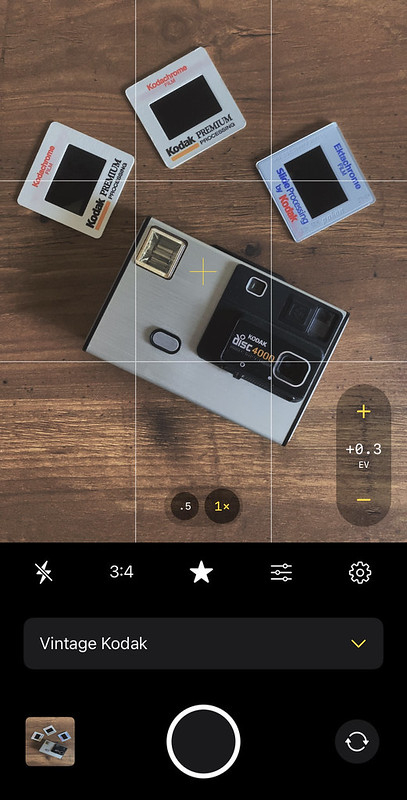
If you ever do product photography that requires you to shoot straight down, it can be difficult to get the camera level. I’m always off by a little, tilted slightly one way or another. But RitchieCam is here to help!

Now, when the phone is flat (parallel to the ground), the gyroscope activates a white and yellow plus that, when aligned (indicated by the yellow plus as the only one visible), lets you know that the phone is level, not tilted in any direction. This feature is always on, so anytime the phone is flat when using RitchieCam, the pluses will appear. Some of you might not ever use this, but for some of you this is a really big deal.

Level
Tilted

Fujifilm X-E4 (X-Trans IV) Film Simulation Recipe: Arizona Analog

Building Storm Over Desert Ridge – Buckeye, AZ – Fujifilm X-E4 – “Arizona Analog”

Inspiration can come suddenly and unexpectedly, and it’s important to be open to it when it comes.

I was at the grocery store the other day, waiting in line to checkout, standing right next to the magazine stand. My wife points out the latest issue of Arizona Highways, which I previously subscribed to, but (with my move from Utah) I let the renewal lapse. She says, “Wanna get it?” I shake my head no, then begin to load the groceries onto the belt. I didn’t want to get it because the subscription price for a year is the same price as four issues at the stand, and because I’m pretty busy right now (still unpacking boxes and such) and I might not read it anyway.

“Do you mind getting me an iced coffee?” My wife asked a moment later. Then, pointing at the stuff on the belt, she stated, “I’ve got this.” There’s a Starbucks in the grocery store, and I was happy to jump out of the line and get a couple of coffees. A few minutes later, just as the barista was done with our order, my wife walks up with the basket of bagged groceries. Sitting right on top was the Arizona Highways magazine.

Old Saguaro – Buckeye, AZ – Fujifilm X-E4 – “Arizona Analog”

When we got home, after unloading the car and putting everything away, I thumbed through the August issue. On page 10 was a photograph by Scott Baxter of a rancher wrangling cattle, which was in a small article called Sierra Bonita Ranch (the picture can be seen if you click the link—click on the picture to see the whole thing—I find it interesting how different it appears on my screen vs in the magazine). I grabbed my Fujifilm X-E4 and threw in some settings that I thought might be close.

I snapped a few photos in the yard, then showed my wife. “Those look good,” she said. “This is where I got the inspiration,” I stated as I showed her Scott’s picture in the magazine. She viewed the picture, then gave me a puzzled look. “We’ve only been home 10 minutes. You made this recipe from that picture?”

“Yes!” I replied with a smile. “Wow,” she said, “that’s really amazing!”

Suburban Americana – Buckeye, AZ – Fujifilm X-E4 – “Arizona Analog”

This recipe isn’t a 100% accurate match to Scott’s picture—it’s pretty close, but not perfect. Not surprising, it’s closer to the printed aesthetic than the digital look, as I hadn’t yet seen it online when I created the recipe. I considered attempting to more closely replicate the aesthetic of the picture, but I really like the look of this recipe—accurate or not—so I decided not to change it. I have no idea what Scott used to capture his picture… apparently he shoots a mix of film and digital.

Thanks to Scott Baxter, Arizona Highways, and my wife’s thoughtful gesture, the inspiration for this recipe came quickly. It was one of the fastest recipes that I’ve ever created. Certainly it’s not for every person or every situation, but I’m sure for some of you in the right situations, you’ll appreciate the aesthetic that this “Arizona Analog” Film Simulation Recipe delivers. It’s compatible with the Fujifilm X-Pro3, X100V, X-T4, X-S10, X-E4, and X-T30 II cameras—I assume the new X-H2s, too, but I haven’t yet tested it on X-Trans V.

Eterna
Dynamic Range: DR400
Highlight: -1
Shadow: +3
Color: -2
Noise Reduction: -4
Sharpness: -2
Clarity: -3
Grain Effect: Strong, Small
Color Chrome Effect: Weak
Color Chrome Effect Blue: Weak
White Balance: Daylight, +6 Red & -3 Blue
ISO: Auto, up to ISO 6400
Exposure Compensation: +1/3 to +1 (typically)

Example photographs, all camera-made JPEGs using this “Arizona Analog” Film Simulation Recipe on a Fujifilm X-E4:

Pavillion – Buckeye, AZ – Fujifilm X-E4
The New West – Buckeye, AZ – Fujifilm X-E4
Curved Trellis – Buckeye, AZ – Fujifilm X-E4
Evening Flowers – Buckeye, AZ – Fujifilm X-E4
Flower Garden Blossoms – Buckeye, AZ – Fujifilm X-E4
Real Bloom over Artificial Turf – Buckeye, AZ – Fujifilm X-E4
Trunk & Flowers – Buckeye, AZ – Fujifilm X-E4
Wall Flowers – Buckeye, AZ – Fujifilm X-E4
Fishhook Barrel Cactus Blossom – Mesa, AZ – Fujifilm X-E4
Rocky Hill Saguaro – Buckeye, AZ – Fujfilm X-E4
Desert Cholla – Buckeye, AZ – Fujifilm X-E4
Dusty Desert – Buckeye, AZ – Fujifilm X-E4

Find this film simulation recipes and over 200 more on the Fuji X Weekly — Film Recipes App!

Help Fuji X Weekly

Nobody pays me to write the content found on fujixweekly.com. There’s a real cost to operating and maintaining this site, not to mention all the time that I pour into it. If you appreciated this article, please consider making a one-time gift contribution. Thank you!

$2.00

Creative Collective 027: FXW Zine — Issue 09 — August 2022

The ninth issue of FXW Zine is out, and if you are a Fuji X Weekly Creative Collective subscriber, you can download it now!

What’s in the August issue? The cover story is a visit to the Arizona State University Polytechnic Campus in Mesa, Arizona, captured with my Fujifilm X-E4. There are a total of 24 photographs this month, including the cover image (above). I hope that you find it enlightening, entertaining, and inspiring!

If you haven’t joined the Creative Collective, consider subscribing today to get access to bonus articles and the FXW Zine—not just this issue, but the first eight issues, too!