Fujifilm X-Pro3 (X-Trans IV) Film Simulation Recipe: Vintage Color v2

February Reaching – Farmington, UT – Fujifilm X-Pro3 – “Vintage Color v2”

This “Vintage Color v2” recipe is a modification of the original Vintage Color Film Simulation Recipe. In the comments, Thomas Schumacher suggested using Classic Negative instead of Eterna. Sometimes when you try a different film simulation than what the recipe calls for, you discover interesting results. Well, I gave it a try and loved the results; however, I made a couple more modifications. Because Classic Negative has a lot more contrast built into it than Eterna, I chose DR400 (instead of DR200) to help prevent clipped highlights. Classic Negative also has more saturation than Eterna, so I set Color to -1 (instead of +1). I also changed Clarity to -3 (instead of -2) just to soften it a tad. The results produced by this “Vintage Color v2” recipe can be absolutely fantastic!

This recipe has almost two different looks, depending on the exposure. You can reduce exposure a little—go almost low-key—and get a wonderfully moody feel. You can also increase exposure a little—go almost high-key—and achieve something somewhat similar to overexposed Fujicolor Pro 400H. You can get beautiful pictures either way. Or split the difference and still get excellent results.

Pillars – Salt Lake City, UT – Fujifilm X-Pro3 – “Vintage Color v2”

This “Vintage Color v2” recipe is compatible with the Fujifilm X-Pro3, X100V, X-T4, X-S10, X-E4, and X-T30 II cameras. As a reminder, Clarity causes the camera to pause for a moment after each shot. I use the pause to slow myself down, but if you need to be quick, and if you shoot RAW+JPEG, you can always set Clarity to 0, and add it later by reprocessing the RAW file in-camera.

Classic Negative
Dynamic Range: DR400
Highlight: +2
Shadow: +3
Color: -1
Noise Reduction: -4
Sharpness: -2
Clarity: -3
Grain Effect: Strong, Large
Color Chrome Effect: Strong
Color Chrome Effect Blue: Strong
White Balance: 7350K, -1 Red & -4 Blue
ISO: Auto, up to ISO 6400
Exposure Compensation: 0 to +1 (typically)

Example photographs captured using this “Vintage Color v2” film simulation recipe on a Fujifilm X-Pro3:

High Rise & Moon – Salt Lake City, UT – Fujifilm X-Pro3
KeyBank – Salt Lake City, UT – Fujifilm X-Pro3
Bronze Building – Salt Lake City, UT – Fujifilm X-Pro3
Bank Above Macy’s – Salt Lake City, UT – Fujifilm X-Pro3
Boy With Nerf Gun – Farmington, UT – Fujifilm X-Pro3
Fake Succulent on Table – Farmington, UT – Fujifilm X-Pro3
House At Last Light – Farmington, UT – Fujifilm X-Pro3
Winter Bloom Remnants – Farmington, UT – Fujifilm X-Pro3
Frozen Pond near Sunset – Farmington, UT – Fujifilm X-Pro3
Grass & Frozen Waterway – Farmington, UT – Fujifilm X-Pro3
Wild Gold – Farmington, UT – Fujifilm X-Pro3
Backlit Marsh Reed – Farmington, UT – Fujifilm X-Pro3

Find this Film Simulation Recipe and over 200 more on the Fuji X Weekly — Film Recipes App!

Help Fuji X Weekly

Nobody pays me to write the content found on fujixweekly.com. There’s a real cost to operating and maintaining this site, not to mention all the time that I pour into it. If you appreciated this article, please consider making a one-time gift contribution. Thank you!

$2.00

New Fujifilm X-Trans IV Patron Early-Access Film Simulation Recipe: Fujichrome Provia 100F

Berry Behind the Baseball Diamond – Farmington, UT – Fujifilm X100V – “Fujichrome Provia 100F”

The Fuji X Weekly app is free, yet becoming a Fuji X Weekly Patron unlocks the best App experience! One benefit of being a Patron is you get early access to some new film simulation recipes. These Early-Access Recipes will eventually become available free to everyone in time, including this new one. In fact, all of the original Early-Access Recipes have been publicly published on this blog and the App, so everyone can now use them. Patrons help support Fuji X Weekly and, really, without them there would be no App, so I want to give a special “thank you” to all of the Patrons!

This new recipe is called “Fujichrome Provia 100F” after the film that it is intended to mimic. Fujifilm introduced Provia 100 in 1994, and replaced it with the much improved Provia 100F in 2001. I’ve only shot a couple of rolls of Provia 100F. I remember that it had a cool color cast (especially when compared to Kodak films), it had a fair amount of contrast, moderate saturation, and tended to render blues strongly. This recipe has been in the works for awhile, with a lot of failed attempts. I think it does pretty well at reproducing the aesthetic of the film, but there are definitely a few compromises—more of the “memory color” that Fujifilm talks about, than perhaps a 100% accurate rendition. Still, I believe that it turned out pretty well overall.

Actual Fujicolor Provia 100F 35mm film. Chicago, 2005.

If you are a Fuji X Weekly Patron, it’s available to you right now on the App!

Example photographs captured using this “Fujichrome Provia 100F” film simulation recipe on my Fujifilm X100V:

Wasatch Front – Farmington, UT – Fujifilm X100V
Blue Sky Reeds – Farmington, UT – Fujifilm X100V
Branch Berries – Farmington, UT – Fujifilm X100V
Baseball Sky – Farmington, UT – Fujifilm X100V
Windsock – Farmington, UT – Fujifilm X100V
Field 3 – Farmington, UT – Fujifilm X100V
Skateboard & Runner – Farmington, UT – Fujifilm X100V
Creek Under Branches – Farmington, UT – Fujifilm X100V
Trail Through the Trees – Farmington, UT – Fujifilm X100V
Fence Along Path – Farmington, UT – Fujifilm X100V
Josh at the Court – Farmington, UT – Fujifilm X100V

Fuji X Weekly App Sighting in MKBHD Video!

Can you spot the Fuji X Weekly App?

While watching an MKBHD video on YouTube, I spotted the Fuji X Weekly App on someone’s phone. It’s like I saw Sasquatch in the forest!

Marques Brownlee, the popular YouTuber who runs the MKBHD channel, published a video two weeks ago: My Everyday Tech: 2022. Brownlee’s team has a behind-the-scenes channel called “The Studio” that’s also quite popular, and they published a companion video: Our Everyday Tech: 2022. In that video, Vinh Dang (who is Brownlee’s Art Director), shares the gear he uses, which includes a Fujifilm X-T3. While discussing his phone, you can see the Fuji X Weekly App prominently displayed, right below the iPhone Camera app, and above the YouTube app. Whoa.

It would be an amazing shock if MKBHD ever mentioned the Fuji X Weekly App and Film Simulation Recipes on their channels. That likely will never happen. But I’m stoked that the App was hiding in plain sight in their video for about four seconds—if you skip to the 6:09 mark you can see it, too. Maybe, like those Bigfoot photos, it’s a little fuzzy, but I swear I saw it between the trees, covered in hair and taking long strides, before disappearing into the dense forest.

Also, almost two months ago I did an interview with FRONT Photography that they recently published, which you can check out here!

Fujifilm X-Trans IV Film Simulation Recipe: Kodak Gold v2

Grass and Frozen Pond – Farmington, UT – Fujifilm X100V – “Kodak Gold v2”

This new film simulation recipe comes from Anders Lindborg (Instagram). Anders is the one who created the Kodak Tri-X 400 recipe, Ilford Pan F Plus 50 recipeseven Fujicolor Pro 160NS recipes, seven Fujicolor Pro 400H recipes, and made an important D-Range Priority discovery. So I know that you’ll love this one, too! He was kind enough to share it with me and allow me to share it with all of you—thank you, Anders!

Anders began by looking at some old prints he has, which were captured on Kodak Gold 200 film. He noticed that these prints looked a little different than my Kodak Gold 200 recipe, but one film can have many different looks depending on how it was shot, developed, printed and/or scanned, or even which generation of the emulsion you’re viewing. This recipe mimics the aesthetic of his prints, but he noticed that it also matches many examples of Gold 200 that he found online.

Kids in a Tree – Farmington, UT – Fujifilm X100V – “Kodak Gold v2”

This recipe is compatible with the Fujifilm X-Pro3, X100V, X-T4, X-S10, X-E4, and X-T30 II cameras. To make this recipe work on the X-T3 and X-T30, Anders suggests using Grain Strong, White Balance 5900K (with the same shift), and ignoring Clarity—I suggest that you consider using a weak diffusion filter, such as 1/8 Black Pro Mist or 5% CineBloom, in leu of Clarity. In addition, for X-Trans III, ignore Color Chrome Effect. The results will be slightly different, but nearly the same. Anders suggests trying this recipe with a 3200K white balance for night photography.

Classic Chrome
Dynamic Range: DR200
Highlight: 0
Shadow: -1
Color: -1
Noise Reduction: -4
Sharpness: -1
Clarity: -2
Grain Effect: Strong, Large
Color Chrome Effect: Weak
Color Chrome Effect Blue: Off
White Balance: 5800K, +2 Red & +4 Blue
ISO: Auto, up to ISO 6400
Exposure Compensation: 0 to +2/3 (typically)

Example photographs, all camera-made JPEGs using this new Kodak Gold v2 film simulation recipe on my Fujifilm X100V:

Moon Behind Pine – Farmington, UT – Fujifilm X100V
Moon Behind Cattails – Farmington, UT – Fujifilm X100V
Safe Zone – Farmington, UT – Fujifilm X100V
Makeshift Gate – Farmington, UT – Fujifilm X100V
Wood Post – Farmington, UT – Fujifilm X100V
Trail to Visitors Center – Farmington, UT – Fujifilm X100V
Green Leaves in January – Farmington UT – Fujifilm X100V
Hanging Red Berries in Winter – Farmington, UT – Fujifilm X100V
Berries and Barren Branches – Farmington, UT – Fujifilm X100V
Brown Reeds – Farmington, UT – Fujifilm X100V
Jo in a Tree – Farmington, UT – Fujifilm X100V
Jo Under The Tennis Net – Farmington, UT – Fujifilm X100V
Back Alley – Farmington, UT – Fujifilm X100V

Find this film simulation recipes and over 200 more on the Fuji X Weekly — Film Recipes App!

Fujifilm X-H1 Film Simulation Recipe: Kodak GT 800-5

Rural Creek – Farmington, UT – Fujifilm H-H1 – “Kodak GT 800-5”

My Kodak Max 800 film simulation recipe was modeled after some film I found that had “Kodak GT 800-3” imprinted on the negatives. After some research I found out that it was Kodak Max Zoom 800 (specifically, the third iteration of this film). Kodak Max Zoom 800 was replaced by Kodak Max Versatility Plus 800 in 2006, and those negatives had “Kodak GT 800-4” imprinted on them. Well, I found some more prints plus the negatives, and this film has “Kodak GT 800-5” imprinted on them. I searched and searched, but I didn’t find any information on this film. My suspicion is that Kodak updated the Kodak Max Versatility Plus 800 film in some way, yet kept the name the same, but that’s just a guess—it could be an entirely different emulsion sold under a different name. In other words, I’m pretty sure “Kodak GT 800-5” is a descendant of Kodak Max 800, but I wasn’t able to find any specific information on it.

The 4″ x 6″ prints I found were captured in 2008 while on a day-trip to Sedona, Arizona, and were developed at Walgreens. I’m pretty sure the film was shot using a disposable camera, although I don’t remember why (I remember the trip, but I don’t remember anything specific about the pictures). The prints have a strong warm (red/orange) color cast, are somewhat desaturated, and have dark shadows. I’m not sure if this is due to the film itself, or the development and printing by Walgreens, or because they’re degrading with time, or a combination of all three—perhaps something else entirely, like sitting too long in a hot car (always a possibility in Arizona). Whatever the reason, I thought the aesthetic was interesting, so I recreated it on my Fujifilm X-H1.

A Poor quality scan of a print from actual Kodak GT 800-5 film.

A goal of mine for 2022 is to buy a better scanner. I had a “better” one (by better, I simply mean better than what I currently have, because it was mediocre, or really “good enough”), but it stopped working about 10 months ago. This current scanner, which is part of a printer/scanner combination, is particularly bad for some reason. I say all of this because the scan above doesn’t do the print justice, but I wanted to include it anyway to give you an idea where the inspiration for this recipe came from.

This Kodak GT 800-5 film simulation recipe is compatible with all X-Trans III cameras, which include the Fujifilm X-Pro2, X100F, X-E3, X-T2, X-T20, and X-H1. You can also use it on the X-T3 and X-T30 by setting Color Chrome Effect to Off. Because of the particularly warm color cast, this isn’t a recipe that’s for everyone or every situation, but in certain situations this will produce interesting results, and some of you will definitely like it.

Passenger Train Platform – Farmington, UT – Fujifilm X-H1 – “Kodak GT 800-5”

PRO Neg. Std
Dynamic Range: DR400
Highlight: 0
Shadow: +3
Color: -3
Sharpness: -2
Noise Reduction: -4
Grain: Strong
White Balance: 7100K, +7 Red & -5 Blue
ISO: Auto up to ISO 6400
Exposure Compensation: +1/3 to +1 (typically)

Example photographs, all camera-made JPEGs captured using this “Kodak GT 800-5” film simulation recipe on my Fujifilm X-H1:

Storm Over Mountains at Sunset – Farmington, UT – Fujifilm X-H1
Winter Mountain – Farmington, UT – Fujifilm X-H1
Snow Covered Blackberry Vines by a Creek – Farmington, UT – Fujifilm X-H1
Winter Berries – Farmington, UT – Fujifilm X-H1
Blossom Remnants 1 – Farmington, UT – Fujifilm X-H1
Blossom Remnants 2 – Farmington, UT – Fujifilm X-H1
Milkweed in January – Farmington, UT – Fujifilm X-H1
Small Spillway – Farmington, UT – Fujifilm X-H1
Rural Road Near Creek – Farmington, UT – Fujifilm X-H1
Path in the Marsh – Farmington, UT – Fujifilm X-H1
Cattails & Frozen Pond – Farmington, UT – Fujifilm X-H1
Frozen Waterway – Farmington, UT – Fujifilm X-H1
Citations Will Be Issued – Farmington, UT – Fujifilm X-H1

Find this film simulation recipe and over 200 more on the Fuji X Weekly — Film Recipes App!

Help Fuji X Weekly

Nobody pays me to write the content found on fujixweekly.com. There’s a real cost to operating and maintaining this site, not to mention all the time that I pour into it. If you appreciated this article, please consider making a one-time gift contribution. Thank you!

$2.00

New FXW App Patron Early-Access Film Simulation Recipe: Analog Gold

Wood Shack – Farmington, UT – Fujifilm X-E4 – “Analog Gold”

The Fuji X Weekly App is free, yet becoming a Fuji X Weekly Patron unlocks the best App experience! One benefit of being a Patron is you get early access to some new film simulation recipes. These Early-Access Recipes will eventually become available free to everyone in time, including this new one. In fact, many Early-Access Recipes have been publicly published on this blog and the App, so now everyone can use them! Patrons help support Fuji X Weekly and, really, without them there would be no App. So I want to give a special “thank you” to all of the Patrons!

This new Patron Early-Access recipe is called Analog Gold because it has a vintage film-like aesthetic with a golden color cast. It produces a warm, somewhat-muted look, and does well in both sunny and overcast conditions. While it’s not modeled after any specific film or process, it does convey an analog quality that’s easy to appreciate. I know that some of you will love this one!

This “Analog Gold” Patron Early-Access Recipe is compatible with the Fujifilm X-T4, X-S10, X-E4, and X-T30 II cameras. If you are a Fuji X Weekly Patron, it’s available to you right now on the Fuji X Weekly App! If you don’t have the App, download it for free today.

Example photographs, all camera-made JPEGs captured using this “Analog Gold” film simulation recipe on my Fujifilm X-E4:

Kaysville Pond in January – Kaysville, UT – Fujifilm X-E4
Weather Radar – Farmington, UT – Fujifilm X-E4
Dry Leaves & Red Berries – Kaysville, UT – Fujifilm X-E4
Rusty Fence Post – Farmington, UT – Fujifilm X-E4
Flowing Creek in Grass – Kaysville, UT – Fujifilm X-E4
Frozen Pond – Kaysville, UT – Fujifilm X-E4
Grass & Frozen Pond Water – Kaysville, UT – Fujifilm X-E4
Grass in the Ice – Kaysville, UT – Fujifilm X-E4
Dry Shrub – Kaysville, UT – Fujifilm X-E4
Helicopters Waiting to Fly – Kaysville, UT – Fujifilm X-E4
Statue & Sky – Kaysville, UT – Fujifilm X-E4

Fujifilm X-H1 (X-Trans III + X-T3 & X-T30) Film Simulation Recipe: Analog Monochrome

Old Tractor 15 – Farmington, UT – Fujifilm X-H1 – “Analog Monochrome”

This film simulation recipe began as an attempt to fulfill a need. You see, there are many Fujifilm cameras (like the X-H1) that are not capable of saving the White Balance Shift within Custom Presets, but there’s a solution: if each Custom Preset uses a different White Balance type, the camera will remember one White Balance Shift per type, and you won’t have to remember to adjust the shift when switching presets. This makes the camera experience more enjoyable.

The problem is that most film simulation recipes use the Auto, Daylight, or Kelvin White Balance types, and you have seven Custom Preset slots. The remaining White Balance types have a limited number of choices. Prior to this recipe, Incandescent had only one option: Eterna Bleach Bypass. Now, if you are using this solution, you can choose either this Analog Monochrome recipe or the Eterna Bleach Bypass recipe—one color and one B&W—for one of your C1-C7 slots.

Doll – Bountiful, UT – Fujifilm X-H1 – “Analog Monochrome”

I didn’t model this Analog Monochrome recipe after any specific film. Instead, I simply set out to create some settings that look good. This recipe has nice contrast with deep blacks, and whites that are bright yet don’t easily clip. I set Grain to Weak for a clean look, but feel free to try Strong for a grittier look. I feel that it has a very nice classic B&W film aesthetic that some of you will really appreciate.

Acros+G
Dynamic Range: DR400
Highlight: +1
Shadow: +3
Noise Reduction: -4
Sharpening: -1
Grain Effect: Weak

White Balance: Incandescent, -8 Red & -8 Blue
ISO: Auto up to ISO 12800
Exposure Compensation: +1/3 to +2/3 (typically)

Example photographs, all camera-made JPEGs captured using this “Analog Monochrome” film simulation recipe on my Fujifilm X-H1:

Minolta SRT303b – Farmington, UT – Fujifilm X-H1
Car Console – Farmington, UT – Fujifilm X-H1
Jon Smiling for the Camera – Farmington, UT – Fujifilm X-H1
Joy Laughing at a Funny Message – Farmington, UT – Fujifilm X-H1
Horse Close Up – Farmington, UT – Fujifilm X-H1
You Shall Not Pass – Layton, UT – Fujifilm X-H1
Jesus Loves You! – Farmington, UT – Fujifilm X-H1
Friendly Neighborhood Snowman – Farmington, UT – Fujifilm X-H1
Winter Walking Path – Farmington, UT – Fujifilm X-H1
Farmington Creek in Winter – Farmington, UT – Fujifilm X-H1
Three Ducks in the Creek – Farmington, UT – Fujifilm X-H1
Snow and Creek – Farmington, UT – Fujifilm X-H1
Winter Tree – Farmington, UT – Fujifilm X-H1
Stump In Snow – Farmington, UT – Fujifilm X-H1
Wild Grass in Snow – Farmington, UT – Fujifilm X-H1
Melting Snow In The Tall Grass – Farmington, UT – Fujifilm X-H1

Find this film simulation recipe and over 200 more on the Fuji X Weekly — Film Recipes App!

Help Fuji X Weekly

Nobody pays me to write the content found on fujixweekly.com. There’s a real cost to operating and maintaining this site, not to mention all the time that I pour into it. If you appreciated this article, please consider making a one-time gift contribution. Thank you!

$2.00

Fujifilm X-Trans IV Film Simulation Recipe: Fujicolor NPH

Winter Evergreens – Weber Canyon, UT – Fujifilm X100V – “Fujicolor NPH”

This film simulation recipe is called “Fujicolor NPH” because it is inspired by that film. Actually, I was attempting a Fujicolor Pro 400H recipe. I had a couple already: Fujicolor Pro 400H for X-Trans III and Fujicolor Pro 400H Overexposed for X-Trans IV. This was originally an Early-Access recipe on the Fuji X Weekly App, and App Patrons have had access to it for nearly a year; however, it’s been replaced by a different Early-Access recipe, so now it’s available to everyone! Since the time that I originally published this, I’ve made a new Fujicolor Pro 400H recipe that I’m quite happy with. This recipe is similar to Pro 400H film, but it’s actually closer to Fujicolor NPH 400, which was the predecessor to Pro 400H. Those two emulsions were similar, with only small differences, but in my opinion this recipe is closer to NPH 400, so that’s why I named it after that film.

Because this film simulation recipe requires Clarity and Color Chrome FX Blue, it’s compatible with the Fujifilm X-Pro3, X100V, X-T4, X-S10, X-E4, and X-T30 II cameras. I believe those who own a newer GFX camera, such as the GFX 100S and GFX 50S II, can use it, too, although results will be slightly different. If you don’t want to use Clarity because it slows down the camera, you could alternatively use a diffusion filter (such as 1/8 Black Pro Mist or 5% CineBloom) instead.

Cold Wetlands – Farmington, UT – Fujifilm X-E4 – “Fujicolor NPH”

Provia
Dynamic Range: DR100
Highlight: -1
Shadow: 0
Color: 0
Noise Reduction: -4
Sharpening: 0
Clarity: -3
Grain Effect: Weak, Large
Color Chrome Effect: Strong
Color Chrome Effect Blue: Strong
White Balance: 5250K, -3 Red & -4 Blue
ISO: Auto, up to ISO 6400
Exposure Compensation: +1/3 to +2/3 (typically)

Example photographs, all camera-made JPEGs using this Fujicolor NPH film simulation recipe on my Fujifilm X-E4 & Fujifilm X100V cameras:

Weber River in Winter – Weber Canyon, UT – Fujifilm X100V
Honey Salmon – Salt Lake City, UT – Fujifilm X100V
Cold Tires – Farmington, UT – Fujifilm X-E4
Sprinkler – Farmington, UT – Fujifilm X-E4
Post – Farmington, UT – Fujifilm X-E4
Frozen Pond – Farmington, UT – Fujifilm X-E4
760 Sign – Farmington, UT – Fujifilm X100V
Blue Sky Reeds – Farmington, UT – Fujifilm X-E4
Old Pepsi Machine – Farmington, UT – Fujifilm X-E4
Stepping Into the Night Circle – Sunset, UT – Fujifilm X100V

Find this film simulation recipe and 200 more on the Fuji X Weekly — Film Recipes App!

Help Fuji X Weekly

Nobody pays me to write the content found on fujixweekly.com. There’s a real cost to operating and maintaining this site, not to mention all the time that I pour into it. If you appreciated this article, please consider making a one-time gift contribution. Thank you!

$2.00

Best Film Simulation Recipes for Cityscapes (Video)

In this “SoundBite” (as we’re calling it) from Episode 05 of SOOC, Fujifilm X-Photographer Nathalie Boucry and I discuss three film simulation recipes that are good for urban photography. This is a short snippet from the show, and it gives you an idea of the type of content that’s found in a SOOC broadcast. If you missed Episode 05 and/or Episode 06, I’ve included them below.

If you’ve never watched, SOOC is a monthly live video series that’s interactive. It’s a collaboration between Nathalie and I. We discuss film simulation recipes, camera settings, and answer your questions. Basically, we’re trying to help you master your Fujifilm camera, with a focus on simplifying your photographic workflow.

The three recipes discussed in this video are:
Kodachrome 64
Jeff Davenport Night
Fujicolor 100 Industrial

Also, if you don’t have the Fuji X Weekly App, be sure to download it for free today.

See also:
Noise & Grain Explained
Fujifilm In-Camera RAW Reprocessing

SOOC Season 01 Episode 05:

SOOC Season 01 Episode 06:

200 Film Simulation Recipes on the FXW App!

A significant milestone was reached when I published the new Kodak High Definition Plus 200 film simulation recipe yesterday: 200 recipes on the Fuji X Weekly App! Yes, if you have the Fuji X Weekly App on your mobile device, you have access wherever you are to 200 film simulation recipes for Fujifilm cameras! Amazing!

If you have a Fujifilm camera and don’t have the Fuji X Weekly App on your phone or tablet, be sure to download it now! The App is free, but becoming a Patron unlocks the best App experience, so consider becoming an App Patron today.

Let’s countdown the last 10 recipes that brought us to 200:

191 — Ektachrome E100GX (Nov 17th)
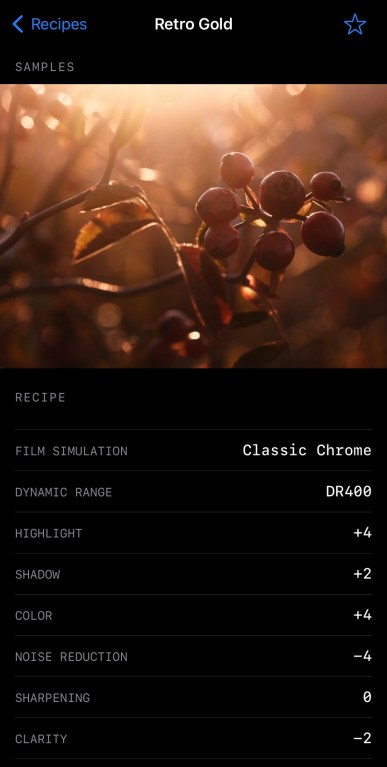
192 — Retro Gold (Nov 21st)
193 — Retro Gold Low Contrast (Nov 23rd)
194 — Fujicolor Analog (Nov 29th)
195 — Kodachrome 25 (Nov 30th)
196 — Vintage Kodacolor (Dec 6th)
197 — Fujicolor NPL 160 Tungsten (Dec. 6th)
198 — Ilford XP2 Super 400 (Dec. 10th)
199 — Winter Slide (Dec. 13th)
200 — Kodak High Definition Plus 200 (Dec. 13th)

Which of these ten recipes are your favorites? Let me know in the comments!

There are actually more than 200 Fuji X Weekly film simulation recipes! Unfortunately, I’m not able to include in the App the ones that require double exposures because they’re more complicated and the format doesn’t allow it. So when I published Retro Gold Low Contrast, that was actually the 200th Fuji X Weekly film simulation recipe. The recipes below are ones you won’t find in the App, and are in addition to the 200 that are there.

Faded Monochrome
Faded Monochrome (X-Trans II)
Split-Toned B&W
Bleach Bypass
Faded Color
Vintage Color Fade
Faded Negative

Have you ever tried any of these double exposure recipes? If so, which one is your favorite? Should I make more like these?

New Fujifilm X-Trans III App Patron Early-Access Film Simulation Recipe: Vintage Kodacolor

Large Stone & Tall Grass – Farmington, UT – Fujifilm X-H1 – “Vintage Kodacolor”

The Fuji X Weekly App is free, yet becoming a Fuji X Weekly Patron unlocks the best App experience! One benefit of being a Patron is you get early access to some new film simulation recipes. These early-access recipes will eventually become available free to everyone in time, including this new one. In fact, many early-access recipes have already been publicly published on this blog and the App, so now everyone can use them. Patrons help support Fuji X Weekly and, really, without them there would be no App. So I want to give a special “thank you” to all of the Patrons!

This new Patron early-access recipe is called Vintage Kodacolor. I was inspired by some old Kodacolor puzzles that I stumbled across (did you know that Kodak made jigsaw puzzles?). I’m not completely certain which Kodacolor film was used for these puzzles—possibly Kodacolor II—or how much the printing process affected the aesthetic, or even how much the colors have faded and shifted over time. Whatever the case, this recipe does a pretty good job emulating it, and produces a warm vintage-like aesthetic that’s easy to appreciate. There’s some similarities between this and my Kodacolor II 126 recipe. This “Vintage Kodacolor” recipe is fully compatible with all X-Trans III cameras, plus the Fujifilm X-T3 and X-T30. Those with newer X-Trans IV cameras can use it, too, but you’ll have to decide on Grain size.

If you are a Fuji X Weekly Patron, it’s available to you right now on the App!

Example photographs, all camera-made JPEGs captured using this “Vintage Kodacolor” film simulation recipe on my Fujifilm X-H1:

Vintage Phragmites – Farmington, UT – Fujifilm X-H1
Evening Reeds and Sky – Farmington, UT – Fujifilm X-H1
Three Brown Leaves – Farmington, UT – Fujifilm X-H1
Don’t Approach the Great Blue Heron – Farmington, UT – Fujifilm X-H1
Safe Zone – Farmington, UT – Fujifilm X-H1
Sunset Through The Grass – Farmington, UT – Fujifilm X-H1
Evening Light on the Wood – Farmington, UT – Fujifilm X-H1
Flowers No More – Farmington, UT – Fujifilm X-H1
Metal Door – Farmington, UT – Fujifilm X-H1
Cardboard Architect – Farmington, UT – Fujifilm X-H1
Holiday Horse Rider – Farmington, UT – Fujifilm X-H1

Fuji X Weekly App is One Year Old Today!

Happy birthday!

The Fuji X Weekly App originally launched on iOS one year ago today! Later, in the spring, it launched on Android. And, less than a week ago, an update was released that made it even better! There’s more coming, too, that will further improve the App. I’m always adding new film simulation recipes, and it’s approaching the 200 mark rather quickly.

It’s been an amazing 12 months!

The Fuji X Weekly App has been downloaded over 180,000 times! Now, some people might have the App on more than one device, or they switched devices and downloaded the App more than once. So I’m not sure how many individuals have downloaded it, but it is absolutely mind-blowing that it has been downloaded that many times! There are about 45,000 active users (meaning, individuals that have used the App at least once in the last month). By far, the vast majority of people use the free version, yet the best App experience is unlocked by becoming a Patron, so if you’re not a Patron, you’re missing out on some great features. Also, Patrons help support the App and other great things within the Fujifilm community. Without the support of Patrons there would be no App, so I want to give a big “Thank You” to all the Fuji X Weekly App subscribers!

If you own a Fujifilm camera, you should have the Fuji X Weekly App on your phone and/or tablet. If you don’t, download it for free today!

New Patron Early-Access Film Simulation Recipe: Fujicolor Analog

Cotton On – Farmington, UT – Fujifilm X100V – “Fujicolor Analog”

The Fuji X Weekly App is free, yet becoming a Fuji X Weekly Patron unlocks the best App experience! One benefit of being a Patron is you get early access to some new film simulation recipes. These early-access recipes will eventually become available free to everyone in time, including this new one. In fact, many early-access recipes have already been publicly published on this blog and the App, so now everyone can use them. Patrons help support Fuji X Weekly and, really, without them there would be no App. So I want to give a special “thank you” to all of the Patrons!

This new Patron early-access recipe is called Fujicolor Analog. I was asked to recreate the look of a certain photographer, and I noticed that a lot of their photographs had a Classic Negative aesthetic, so I thought it would be easy to mimic. It turns out that this person shoots a lot of film, including (but not limited to) Fujicolor C200 and various Superia emulsions, as well as digital (but not Fujifilm, as far as I can tell), using RNI and perhaps some other filters or presets. Nothing said what each picture had been captured with, so it became difficult to recreate. After a little frustration, I decided to select only pictures with a certain aesthetic to attempt to emulate. I believe these might have been captured on a Superia emulsion, but they might not have been—they might not even be film! I think I was able to create a pretty close facsimile to this person’s aesthetic… at least one of the many various (but still somewhat similar) looks that this photographer has.

One film can have many different looks, depending on how it was shot, developed, and printed or scanned. I do believe this “Fujicolor Analog” recipe mimics the aesthetic of a Fujifilm color negative film, but which exact film, and how handled, is uncertain. What is certain is that this is a very nice film simulation recipe that some of you will love! It’s compatible with the Fujifilm X-Pro3, X100V, X-T4, X-S10, X-E4, X-T30 II cameras.

If you are a Fuji X Weekly Patron, it’s available to you right now on the App!

Example photographs, all camera-made JPEGs captured using this “Fujicolor Analog” film simulation recipe on my Fujifilm X100V:

Noble Fir – Kaysville, UT – Fujifilm X100V
Pine Trunk – Kaysville, UT – Fujifilm X100V
Burly Ladder – Kaysville, UT – Fujifilm X100V
Red Lights – Kaysville, UT – Fujifilm X100V
Utah Reeds – Farmington, UT – Fujifilm X100V
Pine in the Sky – Farmington, UT – Fujifilm X100V
Withering Blooms – Orem, UT – Fujifilm X100V
Peaks Above The Gap – Orem, UT – Fujifilm X100V
Arts – Draper, UT – Fujifilm X100V
Stop Spreading Germs – Draper, UT – Fujifilm X100V
Pharmacy Lift – Centerville, UT – Fujifilm X100V

FXW App: Filter by White Balance — How To Use This New Feature

The Fuji X Weekly App was updated just yesterday, and I want to discuss one of the new features that I think will be heavily used: Filter by White Balance! This feature is unlocked by becoming a Fuji X Weekly App Patron.

Filter by White Balance will be a game-changer for many of you. The most obvious use is for finding recipes that match the lighting conditions. Is it sunny? Find a recipe that uses the Daylight White Balance. Is it indoors in mixed lighting? Maybe Auto White Balance would be good. But there’s another way to use Filter by White Balance, which I’ll discuss below, that will make your Fujifilm experience even better!

If your Fujifilm camera is older than the X-Pro3, you cannot save White Balance Shift within the C1-C7 Custom Presets, and each time you change Presets, you have to remember to adjust the WB Shift. It can be a little annoying. However, for each White Balance type, the camera will remember one WB Shift, so if each of your C1-C7 presets uses a different White Balance type, when you switch Presets, you won’t have to adjust the WB Shift. Amazing!

Let’s take a more practical look at this. If you have a Fujifilm X-T3 (for example), we’ll Filter by Camera and select the camera. For the X-T3, you’ll have over 70 recipes to choose from!

Let’s select one recipe to be our C1 in the Custom Settings menu. We’re now going to Filter by White Balance, and tap Auto—there are nearly 40 recipes to choose from! If you find more than one that requires the same WB Shift—Classic Chrome and Velvia both use +1R & -1B, and Velvia v2 and Dramatic Monochrome both use 0R & 0B, just as a couple examples—you can actually use multiple recipes from this White Balance type, and potentially program more than just C1. For this example we’re going to pick just one, perhaps Eterna v3 (interestingly, Agfa Optima 200 shares this same shift, and could be used, too), to be our C1 preset.

For C2 we’re going to select Daylight. There are 12 options to choose from. Kodak Portra 160, Kodak Portra 400, and Kodak Gold 200 all share the same WB Shift, so, in theory, you could program all three of these into your Custom Settings presets. For this, let’s go with Kodak Tri-X 400 to be our C2.

Next, for C3, let’s select Kelvin. You have 15 to choose from. Let’s choose maybe Jeff Davenport Night.

For C4 we’ll go with the Fluorescent 1 White Balance. There are just two options, and we’ll select Kodak Vision3 250D.

It’s the same story for Fluorescent 2: there are only two options. We’ll choose Ektachrome E100G to be our C5 preset.

For C6 we’ll select Incandescent. There’s just one recipe: Eterna Bleach Bypass, so we’ll program that one in.

Lastly, we have C7, and for that we’ll select Shade. There are three options, and we’ll go with Porto 200.

Now we have our C1-C7 Custom Settings presets programmed! C1 is Eterna v3. C2 is Kodak Tri-X 400. C3 is Jeff Davenport Night. C4 is Kodak Vision3 250D. C5 is Ektachrome E100G. C6 is Eterna Bleach Bypass. And C7 is Porto 200. That’s a pretty good set! Since each preset uses a different White Balance type, you won’t have to adjust the WB Shift when you switch presets. For those White Balance types that don’t have very many options, such as Fluorescent 1, Fluorescent 2, etc., if you didn’t like any of the choices, you could alternatively use two recipes that share both the same White Balance and WB Shift (such as the ones mentioned earlier).

You can come up with multiple combinations of these C1-C7 options, and keep track of them using the new colored Stars. Maybe use Green Stars for these seven recipes, and come up with another seven that can be used together and mark them with Blue Stars, and another seven that are marked with Purple Stars. Just an idea.

I hope this all makes sense. Filter by White Balance can be useful in more than one way. If your camera is older than the X-Pro3, this will make your Fujifilm experience more enjoyable, as you won’t have to remember to check the WB Shift each time you change presets. If you don’t have the Fuji X Weekly App, download it now. If you do have the App and it didn’t automatically update, be sure to visit the appropriate App Store and manually update it. If you are not a Fuji X Weekly App Patron, for the best App experience, consider becoming a Patron today!

Available Now: The Fuji X Weekly App Update!

The big Fuji X Weekly App update is available right now!

If your phone or tablet didn’t automatically update the App, be sure to manually update it right away. Depending on your device and how you have it configured, it’s possible that you might have to delete the App and reinstall, but most people shouldn’t have to do that in order to update it. Hopefully for most of you it happened automatically already, and you’re good to go. The App update is in both the Google Play Store for Android and the Apple App Store for iOS.

What’s in this “big” update? Plenty! Some of the things are for everyone, and some of the things are only for Fuji X Weekly App Patrons. Let’s talk about the improvements that are for everyone first, and then we will get to the good stuff that’s for Patrons.

View Sample Pictures Larger

Normal size pictures.
Tap to view pictures larger.

This is a pretty straightforward improvement: tap on a picture to view larger, and tap again to return to normal size. One request that I’ve received many times is the ability to enlarge the sample pictures in each recipe. Now you can! Of course, you can view them even larger (and see more of them) on the website—there’s a link at the bottom of each recipe.

Sort by A-Z, Z-A, Newest-to-Oldest, & Oldest-to-Newest

Before this update, you could only sort the recipes either alphabetically A-Z or chronologically Newest-to-Oldest. Now I’ve added Z-A or Oldest-to-Newest as options. If you know the name of the recipe and it begins on or after the letter N, sorting Z-A might make it quicker to locate. Or if you know that a recipe you are looking for was published awhile ago, sorting Oldest-to-Newest might make more sense. This should make it a little easier and quicker to locate what you are searching for.

Now, to the good stuff!

All of the improvements mentioned below are available for Fuji X Weekly App Patrons. The best App experienced is reserved for Patrons, so if you are not one, consider subscribing today! Simply tap the Gear icon in the App, and then select Become a Patron.

Filter by White Balance or Dynamic Range

There are two new Filter options: White Balance and Dynamic Range. Some users will benefit from Filter by Dynamic Range, but Filter by White Balance is huge! If your Fujifilm camera is older than the X-Pro3, you cannot save White Balance Shift within C1-C7 Custom Presets, and each time you change Presets, you have to remember to adjust the WB Shift. It can be a little annoying. However, for each White Balance type, the camera will remember one WB Shift, so if each of your C1-C7 presets uses a different White Balance type, when you switch Presets, you won’t have to adjust the WB Shift. For many, this is a game-changer!

Favorite with Colored Stars

One really great upgrade is Favoriting with colored Stars. Before, when you tapped the Star to Favorite a recipe, it came in one color (yellow). But now you can choose between five different colors: yellow, red, green, blue, and purple. The benefit of this is that you can use colored Stars to organize recipes. Maybe yellow represents the recipes currently loaded into your camera, red represents the recipes you want to try next, and green represents the ones you tried in the past and really liked. Or maybe yellow is your favorite portrait recipes, green your favorite landscape recipes, and blue your favorite street recipes. Use the colored Stars to categorize the recipes however is meaningful to you. This is a great organizational tool, and, for some, this makes the App a significantly better experience.

Blank Recipe Cards

If you’ve ever created your own film simulation recipe, or if you’ve found some elsewhere that you like (perhaps on the Fuji X Weekly Community Recipes page, such as AstiAmore in the example above), you can now add them to your App! A new feature is blank recipe cards that you fill out. You can even add your own pictures from your camera roll! At some point down the road the idea is that you’ll be able to export, import, and share these custom recipes; however, that ability isn’t in this update—with any luck it will come before summer. Several of you have asked for blank recipe cards, and now you have them! This is a great new feature that many of you will really appreciate.

There’s one other thing that I want to mention: if you tap the Gear icon in the top-left of the App and look way down at the bottom, you will see Shop The Latest Fujifilm Gear. These are affiliate links to B&H and Amazon. If you are shopping for some new gear and you happen to think about it, I’ll be compensated a small amount if you make a purchase using my links. It’s a simple way to support Fuji X Weekly that doesn’t cost you anything.

Below are even more images of the new and improved Fuji X Weekly App!

I want to give a special thanks to Sahand Nayebaziz for all his hard work on this App update! Without him, not only would the App not be nearly as good as it is, but there wouldn’t be a Fuji X Weekly App at all. Thank you so much, Sahand!

How To Use The Fuji X Weekly App (Videos)

I’ve been asked a few times recently to demonstrate through video how to use the Fuji X Weekly App. How do you get the most out of it? Some people are visual learners, and seeing it done makes much more sense than reading about it. If that’s you, this post is intended to help you.

I don’t currently have any videos that demonstrates this, as my two (below) only give a brief glimpse. They’re promotional videos and not how-to, although you can likely glean the gist of how it all works from them. I’m not really a “video guy” (just lightly dabble, I guess), so it’s not easy for me to whip something up real quick. However, I hope this article is helpful to you, as I share what is on YouTube regarding this. There are several great resources out there.

The SOOC series is a good starting point. For those who may not know, SOOC is a monthly live video series, with each episode focused on a different film simulation recipe. It is a collaboration between Tame Your Fujifilm (Fujifilm X-Photographer Nathalie Boucry) and Fuji X Weekly (Ritchie Roesch). SOOC is a fun and educational experience where we not only talk about Fujifilm camera settings, but also answer your questions and give tips and tricks. Basically, we’re trying to help you master your Fujifilm camera, with a focus on simplifying your photographic workflow.

As a part of this, Nathalie and I discuss and even demonstrate aspects of the Fuji X Weekly App. So if you are trying to understand how to use the App and how to get the most out of it, you without a doubt want to watch these episodes! They’re quite long, so under each video I’ve put a time that you should skip ahead to if you don’t want to watch the whole thing.

Skip to 48:43 & 1:06:30
Skip to 32:32
Skip to 23:58
Skip to 42:46 & 49:43
Skip to 21:00 & 29:20

Those SOOC episodes are great resources, and if you have the time I recommend watching them in their entirety. But if not, just skip ahead to those times under each video. Be sure to tune in on December 9th to catch Episode 06, as we will certainly discuss the App even more!

While I don’t have videos that show how to use the Fuji X Weekly App, other people have made some great videos that demonstrate how to do it! Yea! You’ll find these below—I’m sure they’ll be helpful to you.

Hopefully those above videos are great resources to you and will help you understand how to use the App. For those who prefer written words, check out these articles:

How To Add Film Simulation Recipes To Your Fujifilm Camera
Fuji X Weekly App: Filtering by Camera or Sensor?
Why You Should Become A Fuji X Weekly App Patron
Current 10 FXW App Patron Early-Access Recipes
Sneak Peek At The Fuji X Weekly App Update

Fujifilm X-Trans III + X-T3 & X-T30 Film Simulation Recipe: Porto 200

Yellow Bike – Farmington, UT – Fujifilm X-T30 – “Porto 200”

The name of this recipe is not a typo. Awhile back I was asked to make a film simulation recipe for Fujifilm X-Trans II cameras that mimic the aesthetic of photographer João Falcão. I was able to create an X-Trans II recipe that was fairly close, although perhaps not exact. Certainly if you like João’s aesthetic, you’ll appreciate those settings. I called that recipe Porto 200 because Porto is the city in Portugal where João is from. While Porto means “port” I think it has a nice film-stock-like name, similar to “Portra” for example. While there is no film called Porto 200, I decided to use the name anyway.

This Porto 200 recipe is an adaptation of the X-Trans II settings for X-Trans III, plus X-T3 and X-T30, cameras. It’s got a great Kodak-like print-film analog aesthetic. If you have a Fujifilm X-Trans III camera, or the X-T3 or X-T30, I invite you to give it a try. This recipe was one of the original Patron Early-Access recipes on the Fuji X Weekly App, but now it is available to everyone, since a different Early-Access recipe has replaced it—if you are a Patron, be sure to look for it on the App!

Winter Trees – Layton, UT – Fujifilm X-T30 – “Porto 200”

PRO Neg. Std
Dynamic Range: DR200
Highlight: -1
Shadow: 0
Color: 0
Color Chrome Effect: Off or N/A
Sharpness: 0
Noise Reduction: -4
Grain Effect: Weak
White Balance: Shade, 0 Red & -4 Blue
ISO: Auto up to ISO 6400
Exposure Compensation: +1/3 to +2/3 (typically)

Sample photographs, all camera-made JPEGs, captured with a Fujifilm X-T30 using this Porto 200 film simulation recipe:

Monumental – Bountiful, UT – Fujifilm X-T30
Bike in Waiting – Bountiful, UT – Fujifilm X-T30
Yellow Jacket – Bountiful, UT – Fujifilm X-T30
Studio 10 – Bountiful, UT – Fujifilm X-T30
Brick Reflections – Bountiful, UT – Fujifilm X-T30
Opposite Directions – Bountiful, UT – Fujifilm X-T30
Reflecting on Empty Spaces – Bountiful, UT – Fujifilm X-T30
Windshield Bokeh – Farmington, UT – Fujifilm X-T30
Do Not McEnter – Roy, UT – Fujifilm X-T30
Night Train – Clinton, UT – Fujifilm X-T30

Find this film simulation recipe and nearly 200 more on the Fuji X Weekly — Film Recipes App!

Help Fuji X Weekly

Nobody pays me to write the content found on fujixweekly.com. There’s a real cost to operating and maintaining this site, not to mention all the time that I pour into it. If you appreciated this article, please consider making a one-time gift contribution. Thank you!

$2.00

Sneak Peek: Fuji X Weekly App Update

The Fuji X Weekly App is a free mobile film simulation recipe library containing over 175 recipes for Fujifilm cameras! It’s available on both Apple and Android. This is an essential tool to accompany Fujifilm X cameras, so if you don’t have the App, you should go download it now.

Coming very soon is a large update to the Fuji X Weekly App, and I want to give you a sneak peek of what’s in store for you!

Before I begin, however, I want to talk briefly about the benefits of a becoming an App Patron. The Fuji X Weekly App is free, but advanced features are unlocked for Patrons, including Filtering, Favoriting, and early-access to some new recipes. The best App experience is reserved for Patrons.

There are two reasons why I bring this up. First, many of the App update improvements apply to Patron features, and those using the App for free won’t have access to these. The update is big for Patrons, and small for those who are not. Second, I’ve had several people tell me that I need to do a better job selling the Patron subscription because they were unaware of how much better the App is when you become a Patron. “I didn’t know what I was missing,” a couple people recently told me. If you want to get the most out of the Fuji X Weekly App, including the things we’re going to talk about below, you should become a Patron today!

That’s the entirety of my sales pitch (I’m a terrible salesman). Now to the App update sneak peek!

Favoriting & Filtering

One really great upgrade that’s coming is Favoriting on steroids. Before, when you tapped the Star to Favorite a recipe, it came in one color (yellow). But very soon you will be able to choose between five different colors: yellow, red, green, blue, and purple.

The benefit of this is that you can use colored Stars to organize recipes. Maybe yellow represents the recipes currently loaded into your camera, red represents the recipes you want to try next, and green represents the ones you tried in the past and really liked. Or maybe yellow is your favorite portrait recipes, green your favorite landscape recipes, and blue your favorite street recipes. Use the colored Stars to categorize the recipes however is meaningful to you. This will be a great organizational tool, and, for some, this is going to make the App a significantly better experience.

Another awesome App improvement that’s coming is Filter by White Balance. For many, this will be a game-changer. This is going to be the feature for some that makes the Patron subscription worthwhile! Why? Because if your Fujifilm camera is older than the X-Pro3, you cannot save White Balance Shift within C1-C7 Custom Presets, and each time you change Presets, you have to remember to adjust the WB Shift. It can be a little annoying. However, for each White Balance type, the camera will remember one WB Shift, so if each of your C1-C7 presets uses a different White Balance type, when you switch Presets, you won’t have to adjust the WB Shift.

In the App, select Filter by Camera and choose your model—let’s say you have an X-H1. Then Filter by White Balance. Start with Auto, and choose one of those recipes to be your C1 Custom Preset. There are a couple of these recipes that share the same WB Shift, so you could, if you wanted, use more than one, just as long as the WB Shift is the same. Then choose Daylight, and pick one of those recipes to be C2. Again, there are a couple that share the same WB Shift, so you could pick more than one, just as long as the WB Shift is the same. Next is Shade, and there’s just one recipe (right now, anyway) to choose from, so that could be C3. Then select Kelvin, and pick one of those recipes to be C4. Fluorescent 1 is next, and there’s only one recipe to choose from, so that could be C5. Same for Fluorescent 2, and that could be C6. Ditto for Incandescent, and that could be C7. If you picked two Auto and two Daylight recipes (that shared the same WB Shift), then you could skip two of the White Balance options that only have one recipe.

Using Filter by White Balance to help you select recipes for your C1-C7 Custom Presets will make your shooting experience more enjoyable because you won’t have to remember to adjust the WB Shift each time you change to a different Custom Preset.

Custom Recipe (Blank Recipe Cards)

If you’ve ever created your own film simulation recipe, or if you’ve found some elsewhere that you like (perhaps on the Fuji X Weekly Community Recipes page), you will soon be able to add them to your App! A new feature will be blank recipe cards that you fill out. You will even be able to add your own pictures from your camera roll! At some point down the road the idea is that you’ll be able to export, import, and share these custom recipes (that ability won’t be in this update). Several of you have asked for blank recipe cards, and soon you’ll have them! This will be a fun new feature that some of you will really appreciate.

There are, of course, a number of other smaller improvements that are coming with the App update—this is just a sneak peek at three of the bigger ones. With any luck, the update should be out before the end of the month. Oh, and we’ve already begun working on the following update (for sometime next year) that will include a number of other great new features and improvements.

The Current 10 FXW App Patron Early-Access Recipes!

One benefit of becoming a Fuji X Weekly App Patron is that you get early-access to some new film simulation recipes. There are, of course, a number of reasons why you should become a Fuji X Weekly Patron, including Early-Access Recipes—perhaps the best benefit might be the ability to quickly and easily find the recipes that are compatible with your camera. The best App experience is reserved for Patrons.

Currently there are 10 Early Access Recipes on the App. Right now these recipes are only available to Patrons, but they will eventually become free to everyone as new Early-Access Recipes replace them. Several are due to be replaced soon, so this list will probably look significantly different before the end of the year.

Let’s take a look at the current 10 Patron Early-Access Recipes!

Pushed CineStill 800T (X-T4, X-S10, X-E4, X-T30 II)

This recipe is intended to resemble CineStill 800T film, which is Tungsten balanced. Film can have many different aesthetics, depending on how it’s shot, developed, scanned or printed, and viewed, and this recipe is modeled after one particular look from this film. It’s good for night photography, but can produce interesting results in other light conditions.

Snow on the Stormy Mountain – Farmington, UT – Fujifilm X-E4
Empty Harmons Fuel Stop – Farmington, UT – Fujifilm X-E4
Ready To Go Nowhere – Farmington, UT – Fujifilm X-E4

Pushed CineStill 800T (X-Pro3, X100V)

This is essentially the same CineStill 800T recipe above, but adapted for use on the X-Pro3 and X100V cameras. They’re nearly identical, yet very subtly different. Those with an X-T4, X-S10, X-E4, and X-T30 II camera can use it, too, and you get to decide if you like this recipe or the one above better.

City Roses – Farmington, UT – Fujifilm X100V
Cigarettes – Reno, NV – Fujifilm X100V
Hoop – Farmington, UT – Fujifilm X-E4

Kodacolor VR (X-T3, X-T30)

This recipe resembles expired Kodacolor VR film. This film dates back to the early 1980’s, and is a predecessor to ColorPlus 200. A great option for a vintage analog aesthetic.

Inside City Creek – Salt Lake City, UT – Fujifilm X-T30
Stones & Glass Ceiling – Salt Lake City, UT – Fujifilm X-T30
Stoneground – Salt Lake City, UT – Fujifilm X-T30

Vintage Color (X-T4, X-S10, X-E4, X-T30 II)

I described this one as an “artist’s recipe” because it produces a look similar to famed Hudson River School painter Albert Bierstadt, particularly his Yosemite paintings. It’s one of my absolute favorites!

Sentinel & Merced – Yosemite NP, CA – Fujifilm X100V
Yosemite Creek – Yosemite NP, CA – Fujifilm X100V
El Cap & Merced – Yosemite NP, CA – Fujifilm X100V

Old Kodak (X-T4, X-S10, X-E4, X-T30 II)

This recipe is an alternate take on the very popular Vintage Kodachrome recipe. Definitely has an old Kodak feel to it.

Wet Radio Flyer – Farmington, UT – Fujifilm X-E4
Suburban Storm – Farmington, UT – Fujifilm X-E4
Gumby on a Table – Farmington, UT – Fujifilm X-E4

Fujicolor NPH (X-Pro3, X100V, X-T4, X-S10, X-E4, X-T30 II)

Fujicolor NPH was a predecessor to Fujicolor Pro 400H. This recipe produces a nice Fuji print-film aesthetic.

Winter Evergreens – Weber Canyon, UT – Fujifilm X100V
Weber River in Winter – Weber Canyon, UT – Fujifilm X100V
Stepping Into the Night Circle – Sunset, UT – Fujifilm X100V

Vintage Negative (X-Pro3, X100V, X-T4, X-S10, X-E4, X-T30 II)

This recipe was modeled after some old photographs that someone shared with me. In the right conditions it can produce incredibly excellent vintage results.

Vintage Berries – Farmington, UT – Fujifilm X100V
Water Tower – Salt Lake City, UT – Fujifilm X100V
Suburban Reed Evening – Farmington, UT – Fujifilm X100V

Porto 200 (X-Trans III + X-T3, X-T30)

The name is not a typo. Nor is there a film called “Porto 200.” But there is an X-Trans II recipe called Porto 200 (named after Porto, Portugal), and this is an adaptation of it for X-Trans III plus X-T3 and X-T30 cameras.

Yellow Bike – Farmington, UT – Fujifilm X-T30
Winter Trees – Layton, UT – Fujifilm X-T30
Night Train – Clinton, UT – Fujifilm X-T30

Ektachrome (X-Pro1, X-E1)

Loosely resembles Ektachrome film… at least one of the 40+ emulsions that carried the Ektachrome name.

Diesel – Park City, UT – Fujifilm X-Pro1
Two Cans – Weber Canyon, UT – Fujifilm X-Pro1
House Flag – Farmington, UT – Fujifilm X-Pro1

Color Negative Film (X-Trans II)

This recipe is an adaptation of the X-Trans I Color Negative Film recipe, but for X-Trans II cameras. Great for sunny days.

Yellow – Layton, UT – Fujifilm X-T1
No Swimming – Layton, UT – Fujifilm X-T1
Water Logged – Farmington, UT – Fujifilm X-T1 – Photo by Jon Roesch

Find these film simulation recipes and many more on the Fuji X Weekly App!

Why Should You Become a Fuji X Weekly App Patron?

I’ve received feedback from a number of Fuji X Weekly App users with this suggestion: explain better the benefits of becoming a Patron. I’ve heard stories like, “I’ve had the app for awhile, but I didn’t realize how much better it was when you subscribe. I wish I’d known this months ago!” Let me lay out for you the benefits of becoming a Fuji X Weekly App Patron.

First, before I get too far into this, let me briefly explain what the App is and why you should go download it right now, if you don’t already have it on your phone. The Fuji X Weekly App is a mobile film simulation recipe library containing over 175 recipes for Fujifilm cameras. Film simulation recipes are JPEG settings that allow you to achieve various looks, many based on classic film stocks, straight-out-of-camera without the need to edit. These settings save you time, simplify the photographic process, and make capturing pictures even more enjoyable. If you own a Fujifilm camera, you should try these recipes and have the App on your phone. So take a moment right now to download the Fuji X Weekly App if you don’t already have it.

My film simulation recipes are completely free, and the Fuji X Weekly App is also free. There is absolutely no cost to you. It’s my gift to the Fujifilm community—it’s a real honor if you find it beneficial to your photography, as I’m happy to be helpful.

Within the App there is an option to become a Fuji X Weekly Patron (click the gear icon), which is $19.99 (USD + tax) for an annual subscription. Why should you subscribe? What benefits do Patrons get?

Becoming a Patron unlocks the best App experience.

This app does have some advanced features that can be unlocked by becoming a Fuji X Weekly Patron! These advanced features include filtering by sensor or camera, as well as by film simulation or color/B&W, and the ability to favorite recipes for quick access. Let’s take a closer look at the benefits of these features.

Filtering

If you are using the free version of the App, you have to look at each recipe individually to discover which cameras it is compatible with. For example, if you open the Agfa Optima 200 recipe on the App and scroll down a little, it lists all of the fully compatible cameras that this recipe will work on. If your camera is listed, you can use the recipe, and if your camera isn’t listed, you probably need to keep looking. Alternatively, you could cross-reference the recipes using this website, which are sorted by sensor, as a method for narrowing your search.

There is an easier way, if you are a Fuji X Weekly App Patron.

If your camera is, let’s say, a Fujifilm X-S10, you can Filter By Sensor, and select X-Trans IV, and you’ll find the Agfa Optima 200 recipe in the list, because that recipe is compatible with X-Trans IV cameras. If your camera is, let’s say, an X-E3, you can Filter By Sensor, and you’ll find the Agfa Optima 200 recipe in that list, too, because that recipe is also compatible with X-Trans III cameras. Another option is to Filter By Camera. You might think that the Agfa Optima 200 recipe would still show up—and it will for the X-E3—but it won’t show up for the X-S10. Why? Because that recipe isn’t fully compatible with all X-Trans IV cameras, and the X-S10 is one of those that the recipe won’t fully work with; however, it’s 99% compatible, so with one change you can use it. You see, newer X-Trans IV cameras have Grain Size (either Small or Large) that you must choose, a feature not found on older X-Trans IV and X-Trans III cameras, so that’s why it is only 99% compatible.

You have two options to narrow down the recipes that you can use—Sensor or Camera—and understanding these tools can help you find the recipe that you’re looking for. If you want a recipe that is 100% compatible with your camera, then Filter By Camera is what you want to use. Note that you can only choose one camera. If you want to find the most recipes that will work with your camera, but perhaps some aren’t 100% compatible (like Agfa Optima 200 on the X-S10) and you might have to make a choice on a setting (like Grain Size), or accept that it might produce a slightly different look (more on this in a moment), or you might even have to sort through some non-compatible recipes, then Filter By Sensor is what you want to use. Note that you can choose as many sensors as you’d like. If you have an X-S10 and if you Filter By Camera, you’ll find over 60 recipes that are 100% compatible with your camera. If you Filter By Sensor, choosing X-Trans III, X-Trans IV, and GFX, you’ll find over 140! Yes, you can use those 140+ recipes, but that’s a lot to go through.

Other cameras are in a similar situation. Bayer sensor cameras only have six recipes, but you can also use X-Trans I and X-Trans II recipes, although the results will be slightly different. You might like it, you might not, but you won’t know unless you try. If you Filter By Sensor and choose X-Trans I, X-Trans II, and Bayer, you’ll find nearly 40 recipes that will work on your Bayer camera. It’s a similar story if you have an X-Trans II camera. For GFX, many X-Trans IV recipes are compatible with GFX, but will render just slightly different. The bottom line is that you can Filter By Camera and get a limited list of fully compatible recipes that will look as intended on your camera, or you can Filter By Sensor (and even select multiple sensors) and potentially get a much bigger list of recipes that may or may not be good options for your camera model—you get to decide how adventurous you want to be.

In many cases, no matter if you Filter By Sensor or Filter By Camera, there’s still going to be a lot of recipes to choose from, and it can be overwhelming. That’s where Filter By Simulation or Filter By Color/BW comes in handy. If you know that you want a B&W recipe, you can remove all of the color recipes from the list, and if you know that you want a color recipe, you can remove all of the B&W recipes from the list. If you know that you want a Classic Chrome recipe, you can display only those that use Classic Chrome, or if you know that you want an Eterna recipe, you can display only those that use Eterna. These are great tools to really narrow down your search, which will save you time!

Fuji X Weekly App Patrons have a much easier time finding the recipes that they’re looking for. Yes, you could scroll through 175+ recipes individually to find the ones for your camera, or you can use the Filter options to quickly locate exactly what you want, and only Patrons can do that.

Favoriting

Another wonderful tool that is unlocked by becoming a Patron is the ability to Favorite recipes. Once you’ve narrowed down your list with the Filtering options, you can “Star” recipes, and they’ll show up at the top of the list. To Favorite a recipe, with the recipe open, tap the star in the upper-right corner. The Filtering options apply to Favorite recipes, which is demonstrated in the above screenshots. What’s great about this is that, if you have multiple generations of sensors, say X-Trans II and X-Trans III, you can Favorite recipes for both, and when you Filter for your X-Trans II camera, only X-Trans II recipes will show up, and the X-Trans III recipes that you put a Star on won’t display, and vice versa. You can use the Favorite tool to keep track of the recipes that you currently have programmed into your camera, or to list the ones that you want to someday try, or to note the ones that you’ve used and you really like.

Becoming a Patron unlocks early-access recipes.

Fuji X Weekly Patrons also get early access to some new film simulation recipes! There are currently 10 “early-access” film simulation recipes on the App (marked by an aperture symbol), that only Patrons can view. These recipes will eventually be free to everyone, but right now they’re only available to Patrons. As new early-access recipes are cycled into the App for Patrons, the others will be made available to all. My favorite Patron early-access recipes currently on the App are Vintage Color, Old Kodak, Pushed CineStill 800T, Kodacolor VR, and Vintage Negative. Getting early-access to some new film simulation recipes is a fun reward for your support.

Becoming a Patron supports Fuji X Weekly

Nothing is free. My film simulation recipes are free to you, both on this website and on the App, but that doesn’t mean that they’re free—it just means someone else is paying for it. As you can imagine, creating and maintaining an app isn’t cheap. Same for a website. Creating and sharing these recipes takes a lot of time and effort and sometimes even money. All of this is to say that Patrons support the App and website and future film simulation recipes and more! Their support leads to other great things, too, like the Community Recipes page, and even recipes for Ricoh cameras. Patrons partner with Fuji X Weekly for the benefit of the Fujifilm community and beyond, and without their support all of these great things, including the App, wouldn’t happen. Also, if you found film simulation recipes and the app useful to your photography, this is a great way to show your appreciation.

I want to give a big “thank you” to all of the Fuji X Weekly App Patrons! If you’re not already, consider becoming a Patron today.

To conclude, Fuji X Weekly Patrons unlock some great tools for the best app experience, plus they get early-access to some new recipes while supporting Fuji X Weekly for the benefit of the Fujifilm community and more. It’s a win-win!

I want to mention here at the very end of this article that we’re busy building a big App update that will add some great new functions and features. We’re working hard to get this update out before December, and with any luck it will happen. I think you’ll really appreciate these improvements, as they’ll make the Fuji X Weekly App even better!

Learn more about the Fuji X Weekly App here.